
Product Demo Videos for Startups

In today’s competitive startup landscape, product demo videos have emerged as a critical tool for capturing attention and conveying value quickly. For early-stage companies, these videos serve as a dynamic bridge between innovation and audience, distilling complex offerings into digestible visuals. A well-crafted demo video can elevate a startup’s pitch, whether targeting investors, customers, or partners, by showcasing functionality, usability, and real-world impact. Beyond mere explanation, it builds credibility and emotional connection, often influencing decision-making in crowded markets. This article explores how startups can leverage product demo videos to maximize engagement, from scripting and production best practices to strategic distribution—ensuring their solution doesn’t just speak, but resonates.
Why Product Demo Videos Are Essential for Startup Success
Product demo videos are a powerful tool for startups to showcase their innovations, attract investors, and engage potential customers. These videos simplify complex ideas, highlight key features, and create an emotional connection with viewers. For startups, a well-crafted demo video can differentiate them in crowded markets, drive user adoption, and accelerate growth. Below are critical subtopics to optimize this strategy.
See Also Why is E Commerce Such a Hot Area in Venture Capital Now?
How to Craft a Compelling Narrative for Your Product Demo
A strong narrative ensures your demo video resonates with audiences. Start by identifying the core problem your product solves, then structure the story around user pain points and solutions. Use relatable scenarios, testimonials, or data to build credibility. Keep the script concise (60-90 seconds) and focus on value-driven messaging.
| Element | Description |
| Target Audience | Tailor language and visuals to resonate with specific viewers (e.g., investors vs. end-users). |
| Problem-Solution Arc | Highlight the problem first, then introduce your product as the solution. |
| Call-to-Action (CTA) | End with a clear CTA, like signing up for a trial or contacting sales. |
Budget-Friendly Tips for High-Quality Video Production
Startups can create professional-quality videos without overspending. Use affordable tools like Canva for graphics, DaVinci Resolve for editing, and budget-friendly equipment like ring lights. Prioritize clear audio (lavalier mics work well) and leverage free stock footage platforms. Collaborate with freelance videographers for polished results at lower costs.
See Also What Types of Financial Modeling Might Be Useful to an Early Stage Vc
| Resource | Cost-Saving Benefit |
| DIY Scriptwriting | Write scripts in-house to save on copywriting fees. |
| User-Generated Content | Incorporate customer testimonials or beta-tester footage. |
| Template-Based Editing | Use pre-built templates for intros, transitions, and lower editing time. |
Adapt your video format and length to each platform. For LinkedIn, use 2-minute explainers with subtitles; for Instagram, create 15-second teasers. Embed videos prominently on landing pages to reduce bounce rates. Include closed captions for silent viewing and optimize metadata (title, tags) for SEO.
| Platform | Best Practices |
| YouTube | Use keywords in titles and descriptions for search visibility. |
| Twitter/X | Loop short clips with bold text overlays. |
| Website Homepage | Autoplay videos (muted) to grab immediate attention. |
Key Metrics to Measure the Impact of Your Demo Video
Track engagement rates, conversion rates, and watch time to gauge effectiveness. Tools like Google Analytics and Vimeo provide insights into viewer behavior. A/B test different CTAs or video lengths to refine performance. High drop-off rates in the first 10 seconds signal a weak hook.
See AlsoWhat Types of Businesses Do Venture Capitalists Prefer to Invest in| Metric | Purpose |
| View Completion Rate | Measures how many viewers watch the entire video. |
| Click-Through Rate (CTR) | Indicates CTA effectiveness. |
| Social Shares | Reflects audience interest and content virality. |
Common Mistakes Startups Make in Product Demo Videos
Avoid overloading with technical jargon, neglecting mobile optimization, or hiding the CTA. Lengthy videos (over 2 minutes) risk losing attention. Test videos with focus groups to identify unclear messaging. Ensure brand consistency in colors, fonts, and tone.
| Mistake | Solution |
| Ignoring Audience Needs | Research viewer preferences before scripting. |
| Low-Quality Visuals/Audio | Invest in basic lighting and sound equipment. |
| No Story Structure | Follow a problem-solution-benefit framework. |
How to make a great product demo video?

 What Are the Pros/cons of the Different Vc Exit Strategies?
How to Plan an Effective Product Demo Video
Start by defining your target audience and their pain points. Research their needs to ensure the demo addresses specific problems. Outline the key features and benefits your product offers, prioritizing clarity over complexity. Set a clear objective, such as driving sign-ups or educating users, to guide your content.
- Identify your audience: Tailor messaging to their knowledge level and interests.
- Focus on benefits: Explain how the product solves problems, not just technical specs.
- Keep it concise: Limit the video to 1-2 minutes to maintain engagement.
How to Script and Storyboard Your Demo Video
Write a clear script with a logical flow: introduce the problem, present the product, demonstrate usage, and end with a call-to-action. Use a storyboard to visualize scenes, ensuring each shot aligns with the script. Prioritize simplicity and avoid jargon to make the content accessible.
See Also What Do Venture Capital Lawyers Do What Do They Assist Venture Capitalists in What Are Their Day to Day Tasks Like
- Start with a hook: Grab attention in the first 5 seconds.
- Break down steps: Show how the product works in a logical sequence.
- Include testimonials: Add credibility with user quotes or case studies.
How to Film High-Quality Product Footage
Use professional lighting and a stable camera to ensure clarity. Show the product from multiple angles, highlighting critical features. Incorporate close-ups and real-world usage scenarios to make the demo relatable. Avoid cluttered backgrounds to keep focus on the product.
- Lighting setup: Use softbox lights to eliminate shadows.
- Camera angles: Capture overhead, side, and detail shots.
- Demonstrate use cases: Show the product solving actual problems.
How to Edit for Maximum Engagement
Trim unnecessary footage to maintain a fast pace. Add background music and sound effects to enhance mood, but ensure voiceovers remain audible. Use text overlays to emphasize key points. Include transitions and animations to guide viewer attention.
- Cut redundancies: Keep only essential scenes.
- Enhance audio: Balance voice, music, and effects.
- Highlight text: Use bold captions for features or stats.
How to Optimize Your Video for Distribution
Format the video for platform-specific requirements (e.g., vertical for Instagram, horizontal for YouTube). Add subtitles for silent viewing. Include a strong call-to-action (CTA) directing viewers to a website or trial. Test different thumbnails and titles to improve click-through rates.
- Adapt aspect ratios: Resize for social media platforms.
- Add subtitles: Increase accessibility and retention.
- A/B test CTAs: Experiment with placement and wording.
How long should a product demo video be?

The ideal length for a product demo video depends on its purpose, audience, and complexity, but most experts recommend keeping it between 1 to 3 minutes. Shorter videos (under 2 minutes) are optimal for social media or first-time viewers, while more detailed products may require up to 5 minutes to showcase features effectively. Prioritize clarity and engagement over duration.
Factors Influencing the Length of a Product Demo Video
The duration of a product demo video is shaped by several key factors. Product complexity, audience familiarity, and platform requirements all play critical roles. For example:
- Complexity: Technical products (e.g., SaaS platforms) often require longer explanations.
- Audience: B2B buyers may tolerate longer demos than casual consumers.
- Platform: Instagram Reels (under 90 seconds) vs. YouTube (up to 5 minutes).
Optimal Video Length by Platform
Platform algorithms and user behavior dictate ideal video lengths. Tailoring duration to the channel maximizes reach and retention:
- Social Media (TikTok/Instagram): 15–60 seconds for quick, scroll-stopping demos.
- Website/landing pages: 2–3 minutes to balance detail and engagement.
- Email campaigns: 60–90 seconds to maintain click-through rates.
Balancing Depth and Brevity in Demos
Avoid overwhelming viewers by focusing on core features and user benefits. Strategies include:
- Prioritize: Highlight 3–5 key functionalities that solve user pain points.
- Script tightly: Use concise scripting to eliminate filler content.
- Visual storytelling: Replace lengthy explanations with animations or on-screen text.
Audience Attention Span and Engagement
Viewers typically lose focus after 2–3 minutes. To sustain engagement:
- Hook early: Present the product’s unique value within the first 10 seconds.
- Pace dynamically: Use quick cuts, zooms, or transitions to maintain energy.
- Call-to-action (CTA): Place CTAs at the midpoint and end to drive action.
Industry-Specific Examples of Demo Lengths
Best practices vary by sector. For instance:
- SaaS products: 3–5 minutes to explain workflows and integrations.
- Consumer gadgets: 1–2 minutes to showcase design and ease of use.
- Enterprise software: 5–10 minutes for deep dives, often split into shorter segments.
How to start a product demo?
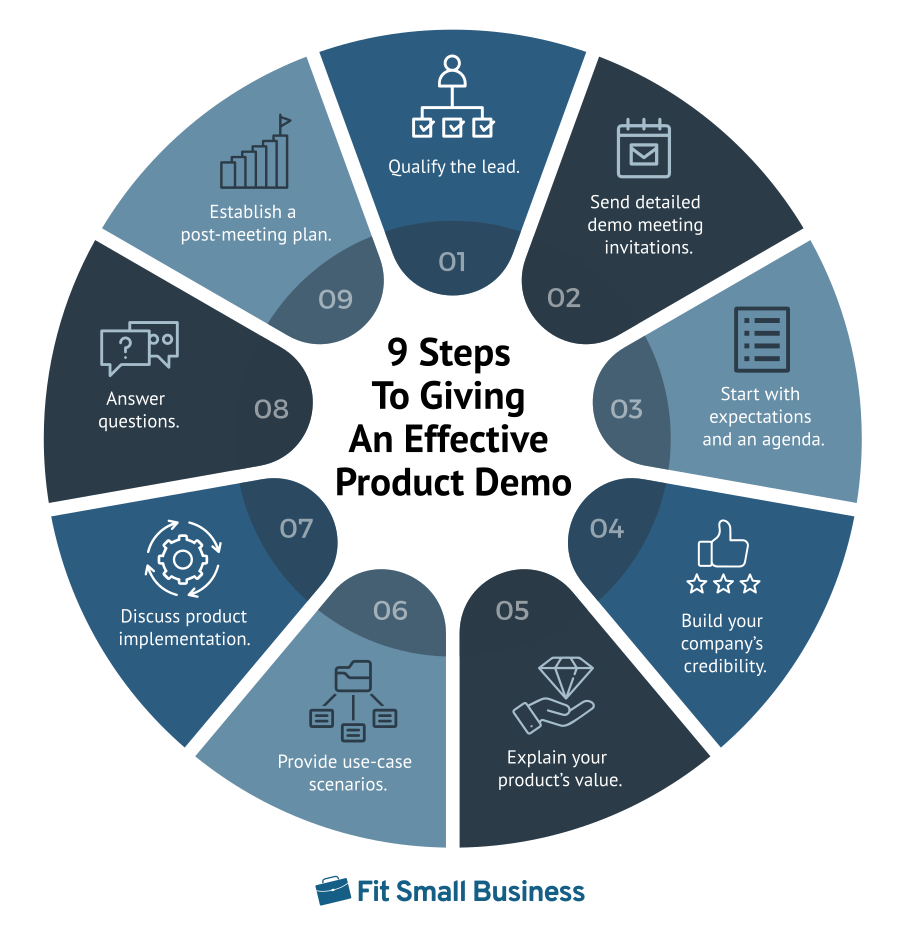
1. Understand Your Audience and Set Clear Objectives
Before starting a product demo, research your audience to tailor your approach. Identify their pain points, roles, and familiarity with similar products. Define clear objectives for the demo, such as highlighting specific features, addressing common challenges, or showcasing usability. This ensures alignment with their needs and keeps the presentation focused.
- Analyze audience demographics (e.g., decision-makers, end-users).
- Prioritize key features that solve their problems.
- Set measurable goals (e.g., securing a follow-up meeting).
2. Craft an Engaging Opening Statement
Begin with a compelling hook to capture attention immediately. Mention a relatable problem or share a surprising statistic related to the product’s value. State the purpose of the demo clearly and concisely, emphasizing how the product addresses their needs.
- Use a question or story to create curiosity.
- Highlight the product’s unique value proposition upfront.
- Outline the agenda to set expectations.
3. Demonstrate the Product’s Core Functionality First
Start by showcasing the primary features that deliver immediate value. Avoid overwhelming the audience with minor details. Focus on user-friendly interactions and outcomes that resonate with their daily workflows.
- Showcase the main use case in under two minutes.
- Explain how it solves a specific problem step-by-step.
- Use simple language to ensure clarity.
4. Prepare and Test Technical Setup in Advance
Avoid disruptions by testing all equipment beforehand. Ensure the product, software, and presentation tools function smoothly. Have backup plans for potential technical issues, such as screen-sharing alternatives or pre-recorded clips.
- Check internet connectivity and device compatibility.
- Rehearse transitions between slides or live demos.
- Prepare backup resources (e.g., screenshots, videos).
5. Encourage Interaction and Questions Early
Foster engagement by inviting questions during the demo, not just at the end. This creates a conversational tone and allows you to address concerns in real time. Use polls, quick polls, or direct prompts to involve the audience.
- Ask open-ended questions to gauge interest.
- Pause after key sections to invite feedback.
- Use interactive tools (e.g., live polls, chat features).
What is the best tool for product demo video?

What is the Best Tool for Creating Professional Product Demo Videos?
The best tool for product demo videos depends on your needs, but Camtasia stands out for its balance of usability and advanced features. It offers screen recording, video editing, and annotation tools, making it ideal for creating polished, professional demos.
- Screen recording with high customization for capturing workflows.
- Built-in editing tools like transitions, animations, and audio enhancements.
- Template libraries to streamline the creation process.
Why Use Loom for Quick and Collaborative Product Demos?
Loom is perfect for teams prioritizing speed and collaboration. Its cloud-based platform allows instant sharing and feedback, making it a top choice for real-time communication.
- Instant recording directly from your browser or desktop.
- Commenting features for team or client feedback.
- Integration with Slack, Google Workspace, and other productivity tools.
How Does Adobe Premiere Pro Enhance High-End Product Demos?
For cinematic-quality demos, Adobe Premiere Pro offers unmatched editing precision. It’s ideal for brands requiring advanced effects, color grading, and multi-track timelines.
- Advanced effects like motion graphics and 3D rendering.
- Seamless integration with Adobe Creative Cloud apps.
- Customizable presets to maintain brand consistency.
Is Screencast-O-Matic Suitable for Beginner-Friendly Demos?
Screencast-O-Matic is a budget-friendly option for beginners, offering intuitive tools for basic recording and editing without a steep learning curve.
- Simple interface with drag-and-drop functionality.
- Basic editing features like trimming and voiceovers.
- Affordable pricing compared to premium tools.
Can Powtoon Make Animated Product Demos More Engaging?
Powtoon specializes in animated explainer videos, helping brands create visually captivating demos with customizable characters, scenes, and transitions.
- Pre-built templates for quick animation creation.
- Drag-and-drop editor for non-designers.
- Voiceover integration to sync narration with visuals.
Frequently Asked Questions (FAQs)
Why are product demo videos crucial for startups?
Product demo videos are essential for startups because they concisely showcase a product’s value proposition to potential customers, investors, and partners. In a competitive market, these videos act as visual pitch tools that explain complex features in an engaging, easy-to-understand format. They help startups build credibility, demonstrate usability, and highlight unique selling points without requiring in-person meetings. Additionally, they are scalable assets for marketing campaigns, social media, and landing pages, driving user acquisition and investor interest.
What key elements make a startup’s product demo video effective?
An effective product demo video for startups should focus on clarity, storytelling, and audience relevance. Start with a strong hook to capture attention within the first 5–10 seconds. Clearly define the problem your product solves, followed by a step-by-step demonstration of its solution. Use high-quality visuals and concise narration to avoid overwhelming viewers. Include customer testimonials or data-driven results to add authenticity. End with a clear call-to-action (CTA), such as visiting a website or signing up for a trial.
How long should a startup’s product demo video be?
The ideal length for a startup’s product demo video is 60–90 seconds. Shorter videos (under two minutes) maintain viewer engagement and align with attention spans on platforms like social media or pitch decks. Focus on highlighting core features and benefits without unnecessary details. If the product is highly technical, consider creating a short explainer video (2–3 minutes) paired with a separate in-depth tutorial. Prioritize quality over quantity—every second should reinforce the product’s value.
Can startups create professional product demo videos on a limited budget?
Yes, startups can produce high-quality demo videos cost-effectively by prioritizing planning and resourcefulness. Use DIY tools like Canva, Lumen5, or free editing software for basic videos. Focus on scriptwriting and storyboarding to ensure a clear message. Leverage affordable freelancers from platforms like Fiverr for voiceovers or animations. If filming live action, natural lighting and smartphone cameras can suffice with proper framing. Remember, authenticity often resonates more than high-budget production, especially for early-stage startups.
Leave a Reply
Our Recommended Articles